Online Bullying
Save the evidence
Save the bullying if possible for evidence. This could include saving text messages or keeping a record of what’s been happening online. If the bullying is happening online but you can’t save it due to the system that’s been used you can use something called ‘print screen’ or ‘screen capture’ to copy information into a document and save that separately as evidence. If you’re not sure how to do this you can search for instructions online.
Use Reporting Facilities
Many social networks allow users to ‘report abuse’ and ‘block’ users. As a parent, guardian or carer you may want to encourage your child to find out (if they don’t already know) how they can report someone online so that they feel confident to do it if they need to. It’s also important for children to understand the need to report people for cyber bullying before they ‘block them’ so that action can be taken.
Use Reporting Facilities
Many social networks allow users to ‘report abuse’ and ‘block’ users. As a parent, guardian or carer you may want to encourage your child to find out (if they don’t already know) how they can report someone online so that they feel confident to do it if they need to. It’s also important for children to understand the need to report people for cyber bullying before they ‘block them’ so that action can be taken.
Keep talking
Any form of bullying can make a child feel alone. Cyber bullying can happen day and night, on school days and weekends. This can be not only upsetting but really tiring. Keep talking with your child to reassure them and let them know that they are not to blame.
When to contact the police
If you think that the level of bullying is serious and that your child is at risk of harm telephone Devon and Cornwall Police on 101 and ask to speak with your local Police Community Support Officer or Youth Intervention Officer. In an emergency always telephone 999.
Like the offline environment there are laws in the UK that apply online. Although each case is different, cyber bullies shouldn’t be surprised to receive a visit from the police if what they have been doing has resulted in a criminal offence. You can find out more about the law at GOV.UK.
Gaming online
How old?
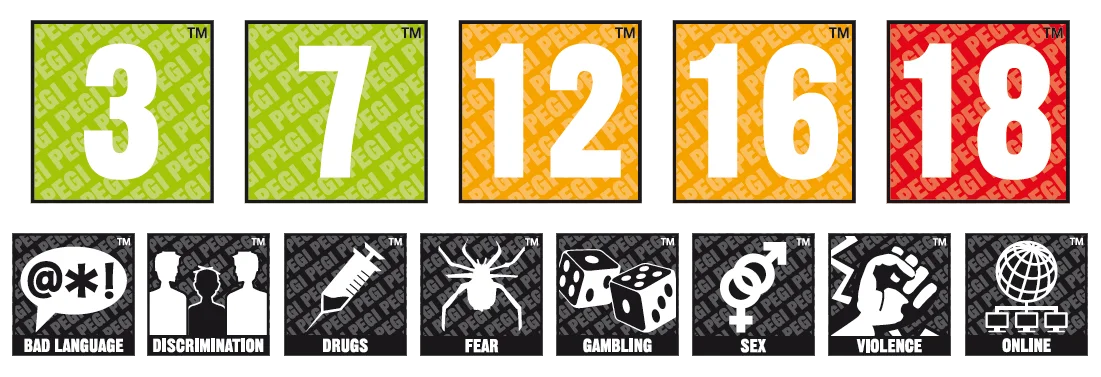
The PEGI system gives age ratings to products to help adults decide if a game is suitable for their child. As well as age ratings, products feature ‘descriptors’ which show why a product has received a certain age rating. For example this might be because it contains violence (including sexual violence), discrimination, depictions of alcohol and drugs, or bad language.
Online gaming things to talk about
If you don’t play online games yourself, it can be more difficult to talk about gaming with children, but here are some things you can ask them like:
- What type of games do you like most? (for example Action, Fantasy, Adventure, Fighting, Racing etc).
- Can you choose the type of character you play in the game?
- What are the characters like?
- What types of things can you do in the game?
- What types of people can you meet in the game?
- What types of things do people like to talk about?
- If someone is being a bully or making you feel uncomfortable, how can you report them in the game?
- Can I have a game with you? (Having a go on the game is a pretty good way to learn, you might have fun but you should probably expect to lose!).
Things to consider when playing online…
Does this game/device have parental controls?
What type of content are they viewing?
Who are they interacting with, adults or children?
Do they understand the risks of sharing personal information online?
Do they know what to do if they are being bullied by another player?
Do they know what to do if they find something that makes feel uncomfortable?
Social Media
Stay secure
- Use the tools available to keep your family and your devices safer
- Set up parental controls. Some systems have them built in and are free, others you can pay for. You may want to look at several options and decide what’s best for your family.
- Keep your technology (including phones) up to date with security software.
- Use strong passwords that include letters, numbers and symbols and use different passwords for different accounts.
- If you’re using social networks, check out the privacy settings and make sure they are activated.
- Report online abuse.
Be cautious
- Read the terms and conditions for social networks. There might be a lot there to read but you could be agreeing to hand over control of your online content if you don’t.
- Never share personal information like phone numbers or email addresses online.
- Be cautious about the type of information you might be sharing with people you only know online.
- Be careful about the types of images you post and share as once they are out there you’ve pretty much lost control of that content.
- Use webcams carefully. If you’re talking with people you know and trust offline you may be confident, but remember that webcam ‘conversations’ can always be recorded.
Separate online and offline
- Use privacy settings – they’re there to protect you not restrict you. A guide to setting your privacy settings has been published by ParentInfo
- Some websites ask you to use your real name but you may be able to choose a username too. Use a nickname if you can.
- Avoid using a picture of yourself for your profile – use a picture of something you like instead.
- Don’t include personal details in your profile, like your phone number, your email address or home address.
#LiveSkills is a package of resources for 8-18 year olds focusing on live streaming, one of the most popular online activities for children and young people.
Category: Online Safety
Audience: KS2
Developed by: Third Party
Duration (minutes): 20-30 x3
Keywords: live streaming, confidence, self-esteem, negative attention, abuse
It explores the features of live streaming and the specific risks children and young people can face, including:
Three 20 minute activities for 8-11 year olds on building confidence and self-esteem in children, and knowing who to trust online
Three 20 minute activities for 8-11 year olds exploring positive and negative attention
A live streaming case study for young people aged 13+ looking at an example of online sexual abuse of a young person via live streaming
Article for young people aged 11-18 focusing on identifying and responding safely to pressure online
A 30 minute presentation for parents/carers explaining live streaming, the risks for young people and tips to support their child to stay safe. This can also be adapted to deliver to professionals
CEOP Talks Relationships is a 6 week campaign helping teachers to educate and support young people in building healthy relationships.
Category: Healthy Relationships, Online Safety
Audience: KS3
Developed by: Third Party
Duration (minutes): 60 x 6
Keywords: Rights, healthy relationships, Nudes (Sexting), law, consent
Week 1 – Starting new relationships
Week 2 – Rights in relationships
Week 3 – Healthy sexual experiences
Week 4 – Sharing nudes and semi-nudes
Week 5 – The internet’s impact on relationships
Week 6 – Creating positive attitudes and cultures
It will also signpost you to a range of our free resources that you can use with young people, parents and carers, and colleagues, that will help to promote healthy relationships and tackle online sexual harassment, online sexual abuse and non-consensual nude image sharing amongst secondary aged young people.
Developed in collaboration with the National Cyber Security Centre, this pack supports an interactive video resource to develop students’ key knowledge, skills and behaviours — to help them navigate the risks of online life.
Category: Cyber Crime, Online Safety
Audience: KS3
Developed by: Third Party
Duration (minutes): 3×45
Keywords:
There are 3 new lessons available in total, covering:
Lesson 1 – Cyber security and the implications/threats
Students will learn about the risks to personal information online, and how to protect personal information
Lesson 2 – Managing devices and accounts
Students will learn how to keep accounts and devices safe, and what to do if security is breached
Lesson 3 – Identifying scams and sources of support
Students will learn how to identify signs of online scams, where to report cyber security incidents and what happens when reporting
A lesson plan to help young people aged 11-14 manage their online lives and build their digital resilience.
Category: Online Safety
Audience: KS3
Developed by: Third Party
Duration (minutes): 45-60
Keywords: resilience, experiences, strategies
Digital resilience is a key skill that we want young people to develop. Whilst going online can be incredibly fun and enjoyable there can also be times when a young person can feel upset, not good enough or left out.
These are the occasions when young people will need strategies to help themselves and also to help their friends if they are having a difficult time online.
This lesson aims to look at the positive and negative experiences young people have online, consider the impact they may have and devise ways to build digital resilience.
Understanding healthy and mutually respectful relationships
Category: Exploitation, Healthy Relationships, Online Safety
Audience: KS3, KS4
Developed by: Third Party
Duration (minutes): 3 x 60
Keywords:
The Exploited film and accompanying lessons aim to help young people understand healthy and mutually respectful relationships; including what healthy and unhealthy features look like in both online and offline contexts and how to report concerns of abuse.
Jessie & Friends is a three-episode animated series which aims to equip 4-7 year olds with the knowledge, skills and confidence they need to help them stay safe from sexual abuse and other risks they may encounter online.
Category: Online Safety
Audience: KS1
Developed by: Third Party
Duration (minutes): 20-30 x3
Keywords: abuse, online behaviour, safety, rights, sharing
Jessie & Friends follows the adventures of Jessie, Tia and Mo as they begin to navigate the online world. They learn that while the internet can be an exciting place where they can learn and have fun, sometimes they may encounter things online which make them feel worried, scared or sad.
The films are accompanied by a comprehensive resource pack for professionals, with session plans for each episode and guidance on safe and effective delivery. Also available are subtitled versions of the animations, storybooks, and posters for parents/carers and children.
(CEOP membership required)
A free lesson pack to help upper KS2 pupils make safe cyber choices and prevent them from unknowingly committing cybercrime, as defined under the Computer Misuse Act 1990.
Category: Crime and ASB, Cyber Crime, Online Safety
Audience: KS2
Developed by: Third Party
Duration (minutes): 2 x 30
Keywords:
Making the right #CyberChoices features a series of fictional characters and real-life, age-appropriate scenarios to encourage pupils to think about why young people commit cybercrime, and the potential consequences — for themselves and others. There are also opportunities for pupils to consider how the same skills being used to commit cybercrime could be used in a more positive way.
Online pornography, healthy relationships and body image
Category: Healthy Relationships, Online Safety
Audience: KS3
Developed by: Third Party
Duration (minutes): 3 x 45
Keywords: body image, healthy, pornography
With Relationship and Sex Education (RSE) becoming statutory in all schools from September 2020, schools need practical, thoughtful and helpful resources to help them teach RSE. Myth vs Reality, our new PSHE Toolkit for 11-14s explores the topics of online pornography, healthy relationships and body image. This toolkit is an extension of our hugely successful practical PSHE toolkit ‘Crossing the Line,’ which aims to generate discussions amongst young people aged 11-14 about their experiences online.
Address the issue of nude image sharing between young people.
Category: Healthy Relationships, Online Safety
Audience: KS3, KS4
Developed by: Third Party
Duration (minutes): 2×60
Keywords:
Address the issue of nude image sharing between young people, informed by groundbreaking research that highlights not only the extent, but also the nature, of the problem. There are two lesson plans in total: one for key stage 3 students on feelings associated with sharing nudes, and another for key stage 4, addressing social attitudes and expectations related to nude image sharing. Both are available exclusively to members of the PSHE Association.
REQUIRES PSHE MEMBERSHIP
An online safety teaching toolkit for educators to deliver with young people aged 11-16 with special educational needs and disabilities.
Category: Bullying, Online Safety
Audience: SEND
Developed by: Third Party
Duration (minutes): 60+
Keywords: Safe, Trust, Action, Respect, Friendship, Cyberbullying
An extensive teaching toolkit to equip, enable and empower educators with the relevant knowledge they need to support young people with special educational needs and disability (SEND).
Focuses on inaccurate and pervasive information online and opens up discussions to develop critical thinking skills.
Category: Online Safety
Audience: KS2, KS3
Developed by: Third Party
Duration (minutes): 60
Keywords: Grooming, Online reliability
This resources aims to educate young people on inaccurate and pervasive information that they might come across online. Developed in partnership with the London Grid for Learning (LGfL) Safeguarding Board, the resource contains lesson plans for both primary and secondary level that discuss how to think critically around the areas of content, contact, and propaganda material that may seek to persuade or change young people’s views.
Support

CEOP Education
With fun activities for children and young people and support and guidance for parents and professionals.

Activating parental controls
Internet Matters.org has produced guides to setting up parental controls across a number of platforms.
General family online safety advice
For general online safety advice we recommend a trip to Get Safe Online.
Gaming/Console support
The following links provide safety support and guidance for their respective consoles and devices.





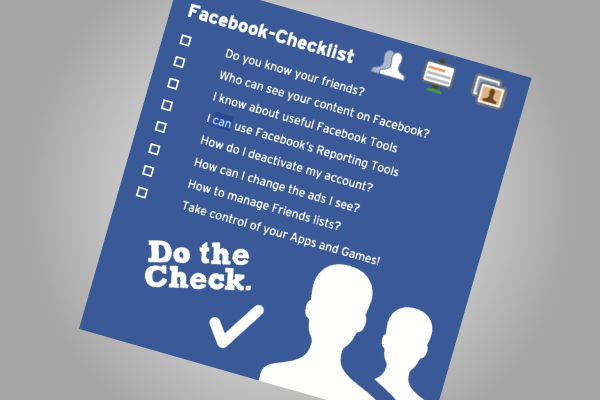
Parental Checklists (From SWGFL)
Phone Support Webpages



Broadband Support